



Plasma cutting is a versatile and efficient method used in metal fabrication and various industrial applications. It provides a quick and precise way to cut through different types and thicknesses of metal. To achieve optimal results, it is crucial to understand and adjust the plasma cutter settings properly. In this article, we will explore the concept of plasma cutter settings and introduce a plasma cutter settings chart that can serve as a valuable reference for users.
Understanding Plasma Cutting
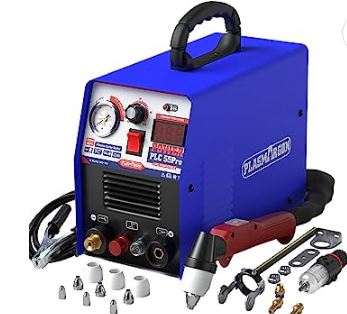
Plasma cutting involves using a focused jet of ionized gas, also known as plasma, to melt and sever metal. The plasma is generated by an electric arc passing through a small nozzle, resulting in a high-temperature and high-velocity stream. This intense plasma stream can easily cut through metal, making it a popular choice for tasks that require precision and speed.
Factors Affecting Plasma Cutter Settings
Several factors come into play when determining the ideal plasma cutter settings for a specific cutting task. Understanding these factors is essential for achieving optimal results.
- Material Thickness
The thickness of the metal being cut is a crucial factor in determining the appropriate plasma cutter settings. Thicker materials require higher amperage and gas pressure settings to generate a plasma arc with sufficient energy to melt through the metal.
- Material Type
Different metals have varying conductive and thermal properties, which influence the plasma cutter settings needed for effective cutting. For example, stainless steel requires different settings than mild steel due to its higher melting point and conductivity.
- Desired Cut Quality
The desired cut quality also affects the plasma cutter settings. For rough cuts or applications where speed is the priority, higher cutting speeds, and lower gas pressures may be suitable. However, for precise and clean cuts, lower cutting speeds and higher gas pressures are typically preferred.
Plasma Cutter Settings Chart
To simplify the process of determining the appropriate plasma cutter settings, a plasma cutter settings chart can be utilized. This chart provides a guideline for different material thicknesses, gas types, and desired cut qualities.
- Amperage
Amperage, measured in amps, determines the intensity of the plasma arc. Higher amperage settings are required for cutting thicker materials, while lower amperage settings are suitable for thinner materials. The settings chart specifies the recommended amperage range for various metal thicknesses.
- Gas Pressure
The gas pressure used in plasma cutting affects the stability and quality of the plasma arc. It is typically measured in pounds per square inch (psi). The chart indicates the recommended gas pressure range based on the material being cut.
- Cutting Speed
Cutting speed refers to the rate at which the plasma torch moves along the metal during cutting. It is measured in inches per minute (ipm) or millimeters per minute (mm/min). The cutter settings chart provides guidelines for selecting the appropriate cutting speed based on the material thickness and desired cut quality.
- Standoff Distance
The standoff distance is the gap between the plasma torch nozzle and the metal surface being cut. It plays a crucial role in maintaining the stability and efficiency of the plasma arc. The settings chart offers recommendations for the optimal standoff distance, ensuring proper cutting performance.
Tips for Using the Plasma Cutter Settings Chart

Refer to the manufacturer’s guidelines: Always consult the plasma cutter manufacturer’s instructions and recommendations for specific settings.
- Test cuts: Before starting a significant cutting project, perform test cuts on scrap material using different settings to fine-tune the parameters.
- Monitor consumables: Regularly inspect and replace consumable parts such as electrodes and nozzles to maintain consistent cutting performance.
- Adjust as needed: Fine-tune the settings based on the actual cutting results. Small adjustments can make a significant difference in the cut quality.
Common Mistakes to Avoid
- Neglecting proper maintenance: Regular maintenance, including cleaning and replacing consumables, is crucial for achieving optimal cutting results.
- Using incorrect settings: Failing to adjust the settings based on material thickness, type, and desired cut quality can result in poor performance and premature consumable wear.
- Ignoring safety precautions: Always follow safety protocols, wear appropriate protective gear, and ensure proper ventilation when using a plasma cutter.
Frequently Asked Questions
What is the plasma cutter settings chart?
The plasma cutter settings chart is a reference guide that provides recommendations for amperage, gas pressure, cutting speed, and standoff distance based on different material thicknesses and desired cut qualities.
How do I determine the appropriate amperage setting?
Refer to the plasma cutter settings chart and select the amperage range recommended for the material thickness you are cutting.
Can I use the same settings for different types of metal?
Different metals have different properties, so it is important to adjust the settings accordingly. Refer to the plasma cutter settings chart for specific recommendations based on the material type.
What happens if I use incorrect plasma cutter settings?
Using incorrect settings can result in poor cutting performance, such as rough edges, dross formation, or inadequate penetration. It can also lead to premature wear of consumable parts.
Are there any safety precautions I should follow when using a plasma cutter?
Yes, always follow safety protocols, wear appropriate protective gear, and ensure proper ventilation when using a plasma cutter to minimize the risk of accidents and injuries.
Conclusion
Understanding and properly adjusting the plasma cutter settings are essential for achieving accurate and efficient cuts. The plasma cutter settings chart serves as a valuable tool, providing guidelines for amperage, gas pressure, cutting speed, and standoff distance. By following these recommendations and considering the material thickness, type, and desired cut quality, users can optimize their plasma cutting process and achieve the desired results.
Related Topics:
- Lime Spreader Settings Scotts – The Ultimate Guide
- The Ultimate Guide to Yardworks Spreader Settings
- scotts spreader settings lbs per 1000 sq ft
- republic ez broadcast spreader settings
- Kreg Jig Depth Collar Settings
- How to Adjust Printer Settings for Avery Labels
- Yeswelder Settings Chart
- Mig Welder Settings for Mild Steel
- Millermatic 252 Settings Chart
- Cut 50 Plasma Cutter Settings Chart
